March 24 - 27, 2026
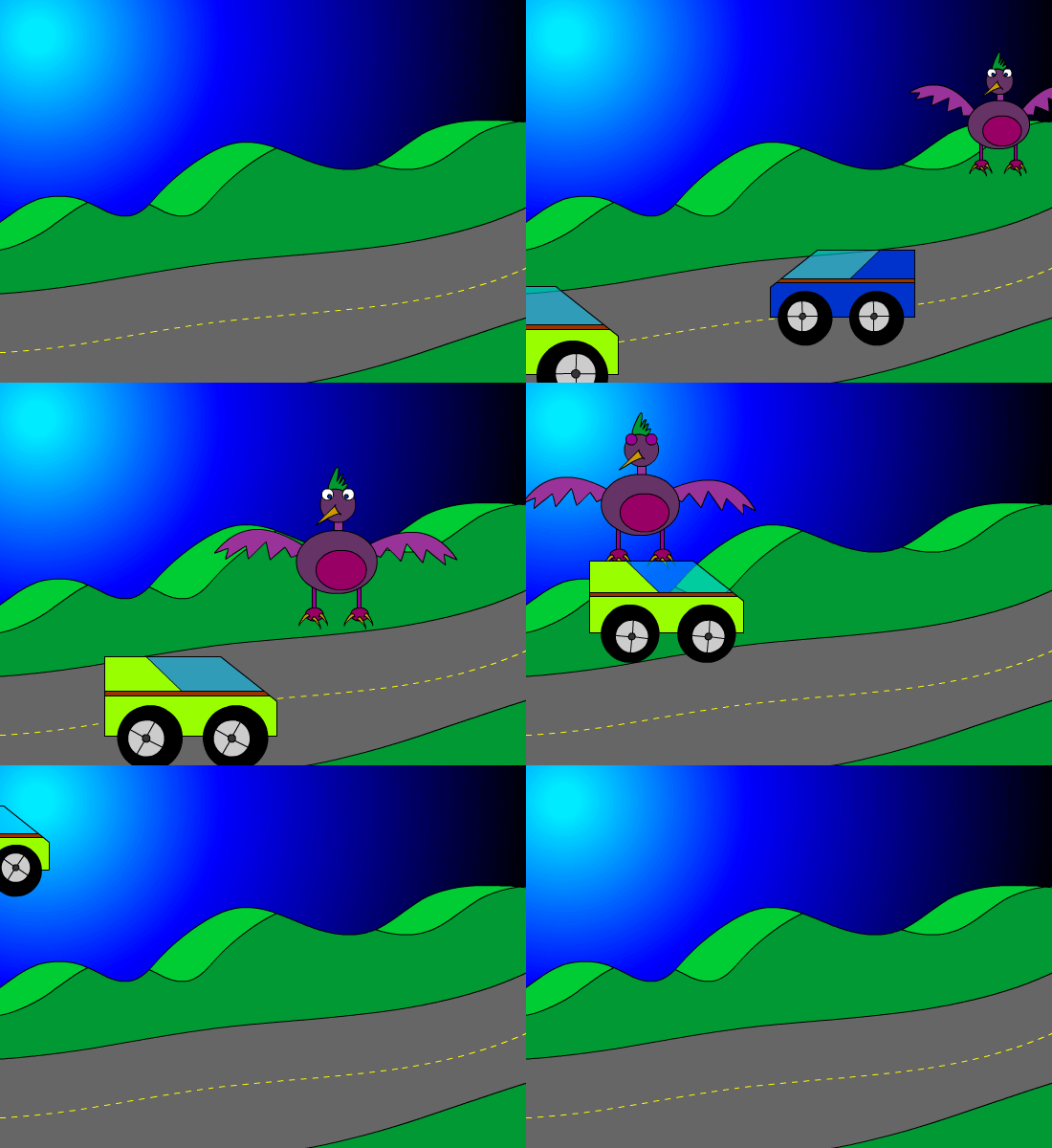
Assignment: Create 5 characters and 5 Backgrounds.
- 5 Characters (50 pts)
- 5 Backgrounds (50 pts)
Details: Using scenes, create five different points of view. For example create an establishing shot from a distance, use medium shots, close ups birds eye view, and other angles.
Starter Question
Tuesday, March 24, 2026
Monday, March 9, 2026
Week 28 2026 Brainstorm & Planning
March 9-13, 2026
Objective: Brainstorm & Planning
Assignment: Storyboard (50 pts)
Details: Draw your cartoon in a storyboard.
Assignment: Create 5 characters and 5 Backgrounds.
- 5 Characters (50 pts)
- 5 Backgrounds (50 pts)
| Digital Graphics | |||
| March 3-7 | Week 27 |
Character Design & Storyboard
| |
| March 10-14 | Week 28 | 5 Backgrounds | |
| March 17-21 | Week 29 |
Sound FX & Animation
| |
| March 25-28 | Week 30 | Title & Credits | |
| Mar. 31-April 4 | Week 31 |
Update Portfolio
| |
| April 7-11 | Spring Break |
Objective: Brainstorm & Planning
Assignment: Storyboard (50 pts)
Details: Draw your cartoon in a storyboard.
Assignment: Create 5 characters and 5 Backgrounds.
- 5 Characters (50 pts)
- 5 Backgrounds (50 pts)
Tuesday, March 3, 2026
Week 27 2026 Shape Tween & Graphic Symbol
March 2 - 6, 2026
Objective: Draw using shapes and lines.
Assignment: Shape Tween Animation 25 pts.
Details: Use the drawing tools to draw a background in Animate. Use color and the gradient tool to make it look good.
Save As: Shapetween.fla
Objective: Use Graphic Symbols to Animate
Assignment: Graphic Symbol (50 pts)
Details: Draw an object and convert to a Graphic Symbol. Double click on the symbol and animate on new timeline.
Save As: GraphicSymbol.fla
Video Tutorials
Shape Tween Animation
Graphic Symbol
Pause a Character
Grow Character
Objective: Draw using shapes and lines.
Assignment: Shape Tween Animation 25 pts.
Details: Use the drawing tools to draw a background in Animate. Use color and the gradient tool to make it look good.
Save As: Shapetween.fla
Objective: Use Graphic Symbols to Animate
Assignment: Graphic Symbol (50 pts)
Details: Draw an object and convert to a Graphic Symbol. Double click on the symbol and animate on new timeline.
Save As: GraphicSymbol.fla
Video Tutorials
Shape Tween Animation
Graphic Symbol
Pause a Character
Grow Character
Tuesday, February 24, 2026
Week 26 2026 Animation
February 23 - 26, 2026
Objective: Animate using the timeline.
Assignment: 5 second frame by frame animation. (50 pts)
Drawing: Find on notebook or a sticky pad. Create a short frame by frame animation on the corner of 30 pages to make an animation. Flip book Example
Details: Use the timeline to create a frame by frame animation. You will need to use the hot key F6 to create a key frame & Shift + F5 to remove key frames. The animation will go for 120 frames which is 5 seconds.
Video Tutorial: 002 Adobe Animate: frame by frame
Objective: Use Tween to Animate
Assignment: Tween Animation (50 pts)
Details: Use the timeline to create a tween animation. You will need to use the hot key F5 to create a frames & Shift + F5 to remove frames. The animation will go for 120 frames which is 5 seconds. Use a minimum of 3 Layers.
Video Tutorial:
Objective: Animate using the timeline.
Assignment: 5 second frame by frame animation. (50 pts)
Drawing: Find on notebook or a sticky pad. Create a short frame by frame animation on the corner of 30 pages to make an animation. Flip book Example
Details: Use the timeline to create a frame by frame animation. You will need to use the hot key F6 to create a key frame & Shift + F5 to remove key frames. The animation will go for 120 frames which is 5 seconds.
Video Tutorial: 002 Adobe Animate: frame by frame
Objective: Use Tween to Animate
Assignment: Tween Animation (50 pts)
Details: Use the timeline to create a tween animation. You will need to use the hot key F5 to create a frames & Shift + F5 to remove frames. The animation will go for 120 frames which is 5 seconds. Use a minimum of 3 Layers.
Video Tutorial:
Tuesday, February 10, 2026
Week 24 2026 Drawing
February 9-12, 2026
Objective: Draw using shapes and lines.
Assignment: Drawing 50 pts.
Details: Use the drawing tools to draw a background in Adobe Animation. Use color and the gradient tool to make it look good.

Video Tutorial
001 Adobe Animate: Drawing
Flash Properties & Stage
Flash Selection Tool
Flash scale & rotate
Flash Color & Gradient Tool
Flash Drawing Backgrounds
Flash Drawing Characters
Objective: Draw using shapes and lines.
Assignment: Drawing 50 pts.
Details: Use the drawing tools to draw a background in Adobe Animation. Use color and the gradient tool to make it look good.

Video Tutorial
001 Adobe Animate: Drawing
Flash Properties & Stage
Flash Selection Tool
Flash scale & rotate
Flash Color & Gradient Tool
Flash Drawing Backgrounds
Flash Drawing Characters
Wednesday, February 4, 2026
Week 23 2026 Foley Artist
February 2 - 6, 2026
Objective: Record Audio
Assignment-4: Five Foley Sounds
Details: Create 5 sounds. Use a recording device to record your 5 sound FX.
Upload to Portfolio: https://freemangraphics.weebly.com/audio.html
Export as: .mp3 or .m4a
Who invented Foley sound?
Jack Donovan Foley (April 12, 1891 – November 9, 1967) was the developer of many sound effect techniques used in filmmaking. He is credited with developing a unique method for performing sound effects live and in synchrony with the picture during a film's post-production.
Career: Foley Artist
How much money does a Foley artist make a year?
The U.S. Bureau of Labor Statistics does not collect employment or wage data for foley artists. But according to the Motion Picture Editors Guild, the guaranteed wage for guild member foley artists is $2,000 per week, $340 per day, or $42 per hour.
Foley artist - Bureau of Labor Statistics
https://www.bls.gov/careeroutlook/2011/spring/yawhat.pdf
Assignment-4: Five Foley Sounds
Details: Create 5 sounds. Use a recording device to record your 5 sound FX.
Upload to Portfolio: https://freemangraphics.weebly.com/audio.html
Export as: .mp3 or .m4a
Who invented Foley sound?
Jack Donovan Foley (April 12, 1891 – November 9, 1967) was the developer of many sound effect techniques used in filmmaking. He is credited with developing a unique method for performing sound effects live and in synchrony with the picture during a film's post-production.
Career: Foley Artist
How much money does a Foley artist make a year?
The U.S. Bureau of Labor Statistics does not collect employment or wage data for foley artists. But according to the Motion Picture Editors Guild, the guaranteed wage for guild member foley artists is $2,000 per week, $340 per day, or $42 per hour.
Foley artist - Bureau of Labor Statistics
https://www.bls.gov/careeroutlook/2011/spring/yawhat.pdf
Tuesday, January 27, 2026
Week 22 2026 Radio Ad
January 26 - 30 2026
Objective: Record audio
Assignment-3: Radio Ad
Details: Create a 10-30 second ad for radio. Use sound effects and record your voice for the ad. Include a minimum of 3 sound effects.
Upload to Portfolio: https://freemangraphics.weebly.com/audio.html
Break up into a groups of 2 to 3 students.
Brainstorm ideas.
Topics:
1. Sell a product.
2. Promote an event
3. Warning
Part 1 - Write a script of what is going to be said.
Part 2 - Record Voice in QuickTime or Garage Band.
Part 3 - Add 3 or more sound effects.
Links for sound effects
Adobe Express: https://new.express.adobe.com/
Sound Bible: http://soundbible.com/
FMA: http://freemusicarchive.org/genre/Electronic/
Imcompetech: http://incompetech.com/
Find Sounds: http://www.findsounds.com/
Objective: Record audio
Assignment-3: Radio Ad
Details: Create a 10-30 second ad for radio. Use sound effects and record your voice for the ad. Include a minimum of 3 sound effects.
Upload to Portfolio: https://freemangraphics.weebly.com/audio.html
Break up into a groups of 2 to 3 students.
Brainstorm ideas.
Topics:
1. Sell a product.
2. Promote an event
3. Warning
Part 1 - Write a script of what is going to be said.
Part 2 - Record Voice in QuickTime or Garage Band.
Part 3 - Add 3 or more sound effects.
Links for sound effects
Adobe Express: https://new.express.adobe.com/
Sound Bible: http://soundbible.com/
FMA: http://freemusicarchive.org/genre/Electronic/
Imcompetech: http://incompetech.com/
Find Sounds: http://www.findsounds.com/
Wednesday, January 21, 2026
Week 21 2026 Audio Editing
January 20 - 23, 2026
Objective: Editing audio files
Assignment-1: 30 second song.
Details: Using Garage Band, create a 30 second song using the Garage Band loops.
Assignment-2: Three Ringtones or Sound Effects
Details: Using Garage Band, create 3 ringtones at 10 seconds a piece.
Terms to be familiar with the physics behind sound:
Objective: Editing audio files
Assignment-1: 30 second song.
Details: Using Garage Band, create a 30 second song using the Garage Band loops.
Assignment-2: Three Ringtones or Sound Effects
Details: Using Garage Band, create 3 ringtones at 10 seconds a piece.
Terms to be familiar with the physics behind sound:
1.Wavelength - the length of one cycle in a wave. Changing the wavelength changes the pitch.
2. Amplitude - the height of a wave. Change the amplitude changes the volume.
3. Frequency- how many cycles/second. The unit of measurement is
Hz. To determine the frequency of a wave take the length of time for
one cycle, ie .002 seconds, and divide it by one cycle: 1/.002 = 500 Hz.
This means that there are 500 cycles per second.
4. Equal Loudness Principle: If the amplitude stays the same but we
change the frequency, low and really high frequencies sound quieter
than the mid-range frequencies. Our ears perceive the frequencies to be
different volumes even though the volume isn't changing. The louder
the frequencies are played at the more similar the volume will be on all
the frequencies.
5. Decibels- we measure the loudness of sound by decibels, dB. Key decibel levels are:
40dB- whisper
60 dB- conversation
70 dB - busy street
80 dB- acoustic guitar 1" away
90 dB- baby crying
110 dB- Power tools
130 dB- Rock Concert.
6. Dynamic Range of Human Hearing: 0 dB-120dB (threshold of human hearing)- 140dB (threshold of pain).
7. Frequency range of human hearing: 20Hz-20,000Hz. lowest and highest perceived pitch.
8.
Temporary Threshold Shift (TTS)- when we are in loud environments our
ears protect themselves by temporarily shutting down, so we can't hear
as well. After a couple of hours or days hearing returns to normal,
unless the exposure was too long in which case hearing damage
becomes permeant.
9. Earwax- our body's natural protection against loud sounds.
Links:
Soundation: http://soundation.com/studio/
Extract from YouTube: http://www.clipconverter.cc/
Audacity: http://audacity.sourceforge.net/
Links:
Soundation: http://soundation.com/studio/
Extract from YouTube: http://www.clipconverter.cc/
Audacity: http://audacity.sourceforge.net/
Tuesday, January 13, 2026
Week 20 2026 Portfolio & State Test
January 12-15, 2025
https://forms.gle/Vd8713vwBqwXNpV77
Portfolio Example.
2-Pre-Test (50pts)
https://forms.gle/vR5Tmz55dZgUM8zH9
3-State Test Review (25pts)
Review
4-State Test: Create an account
https://signin.youscience.com/
State Test Code (100pts)
8: 6WF23E42Z
Wednesday, January 7, 2026
Week 19 2026 Collage
January 5 - 9, 2026
Objective: Combine 5 or more image in a layout.
Assignment: Collage
Details: Create a collage using 5 or more image. Include text, layer styles and a background.
Size: 10" x 7.5" 225 Resolution.
Objective: Combine 5 or more image in a layout.
Assignment: Collage
Details: Create a collage using 5 or more image. Include text, layer styles and a background.
Size: 10" x 7.5" 225 Resolution.
Subscribe to:
Comments (Atom)