Thursday, September 5, 2019

Week 3 2019 Pen Test

Sept. 3 - 6, 2019

Assignment: Pen Test
Details: Download the Pen Tool test and practice manipulating curves.

Download: Pen Test


Assignment: Trace a professional Logo (25pts)
Details: download a few logos, open them up in Illustrator and use the pen tool to trace and redraw a couple of logos.


Tuesday, August 27, 2019

Week 2 2019 Floor Plan

August 26 -  30, 2019

Assignment (nameplate.ai)
-Name Plate

Description
-Using the pen tool create a Name Plate


Objective: Using Layers
Assignment (Floorplan.ai)
-House (Floor Plans)

Description: Draw one floor in your house. use layer for walls, doors, windows, furniture and text.


Monday, August 19, 2019

Week 1 2019

August 19-23, 2019

Welcome to Digital Graphics Art Intro. This semester you will be learning how to use Illustrator, Photoshop, Animate, html, Audio, Film editing and many other software programs. Digital Graphics takes patience and practice but can be very rewarding. Each week you will be given an assignment do the best you can do. All of your assignments will be placed in an electronic portfolio.

Starter
Every day on the board answer the starter quest in the first 5 minutes of class.

1st Day
-Take a picture of yourself
-Write a bio about yourself.
-Write 2 goals for this class.

Assignments
-Disclosure
-Pretest

Illustrator is a Vector based tool used to create logos, clip art, t-shirt designs, and many other graphics. Learned how to use the Selection Tool, Moving objects, creating rectangles, ellipses, changing color of the fill and stroke, Duplicating, rotating. Went over the Zoom tool, Align, and Pathfinder.


Assignments:
-Disclosure
-Boxes & Shapes 


Assignment: (boxes.ai)


Description: Only using boxes and color create a graphic or image.


Assignment 2: (Shapes.ai)

-Draw an image using the shapes tool.

Description: Add a background and other details to your shapes image.


Wednesday, May 29, 2019

Week 39 2019: Testing

May 29 - June 1, 2018


1-Pre-Test (50pts)
2-Kahoots (25pts)


3-State Test Review (25pts)
Google Sides Review


4-State Test Code (150pts)
1: LCAEFFPD
6: DGQNBGKG
7: D6E9GMUT

 https://www.precisionexams.com/usoe/welcome/

5-Submit Portfolio (100pts)
https://goo.gl/forms/ler1PEhnRR6D9Qgn2

6-Sr. Survey. (Only if you are a Senior.)
https://docs.google.com/forms/d/e/1FAIpQLScl6QF0K2iQ-kBvxBzWxCpiwcHglqx70QzF_kDrEoe4L05-iQ/viewform

Thursday, May 23, 2019

Week 38 2019: Study Guide

May 20-24, 2019

Practice Test:

Period 1: Digital Media Practice Test (052319_1)

Period 6: Digital Media Practice Test (052419_6)

Period 7: Digital Media Practice Test (052419_7)


Assignment: Study for test.

2019 Digital Media 1B State Standards

STANDARD 8
2D Animation -- Students will produce and utilize 2D animation.

:-) (-:

Keyframe
Frame by Frame Animation:
Tween
FPS: Frames Per Second
24 FPS for Animation.

STANDARD 9
Digital Video: Students will plan, create, edit, and publish digital video.

Camera Angles

Helpful websites for study:
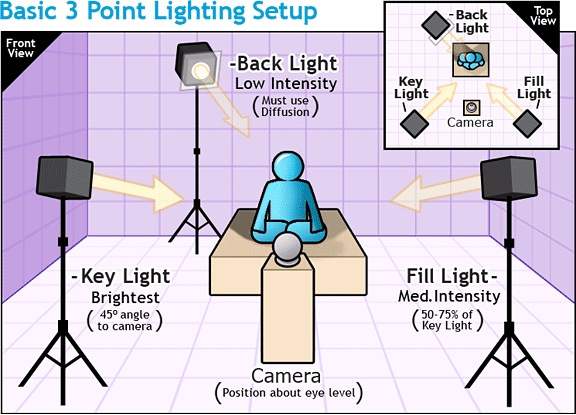
  3 Point Lighting Diagram
http://www.mediacollege.com/lighting/three-point/ Lighting
http://www.mediacollege.com/lighting/ambient/ Ambient Lighting

Point Light:
http://escience.anu.edu.au/lecture/cg/IlluminationJ3D/pointLights.en.html


Aspect Ratio: 
http://apex.infogridpacific.com/dcp/flo-aspect-ratio.html


Monday, May 13, 2019

Week 37 2019: Sound

May 13-17, 2019

Assignment: 5 Sound FX (100 pts)
Details: Use sounds library in flash, download or create sound effects in Garage Band. Use .mp3 or .wav files when importing into flash.

Sound FX Links
Soundbible
Freesounds
Findsounds
Flash Kit
Speak Text
Sounddogs


Monday, May 6, 2019

Week 36a 2019: Ninja Animator

May 6 - 10, 2019

Objective: Scene Animation
Assignment: Complete Levels 1-4 (100 pts)
Click to download Level 1-4


Flash Ninja Animation Tutorials

End

Photoshop Assignments