Thursday, September 2, 2021

Week 3b 2021 Logo Research

Aug. 30 - Sept. 3, 2021


Assignment: Logo Research
Details: Research what your logo needs to communicate to your consumers.
Links: https://99designs.com/launch/logo-design/bdcd9bb46fad1420/brief

Background Information
-Name in logo.
-Type of organization or product.
-Target audience.
-Type of Industry.

Visual Style
-Word mark: Organization name in a stylized type/font become the logo.
-Pictorial mark: An image or shape that is easily recognizable is used to represent your business.
-Abstract mark: An abstract shape or symbol in used to convey the values of your business.
-Letter mark: Letters/initials from your business name are used to create a logo.
-Emblem: Organization name enveloped by a pictorial.
-Character: A character or mascot to represent your business.
-Web 2.0: Representing trends from the internet including gradients, rounded corner etc.


Colors
Common associations in Western culture
  • Red: Passion, Anger, Vigor, Love, Danger
  • Yellow: Knowledge, Energy, Joy, Intellect, Youth
  • Green: Fertility, Wealth, Healing, Success, Growth
  • White: Purity, Healing, Perfection, Clean, Virtue
  • Blue: Knowledge, Trust, Tranquility, Calm, Peace, Cool
  • Black: Fear, Secrecy, Formal, Luxury
  • Purple: Royalty, Wisdom, Spirituality, Imagination
  • Orange: Creativity, Invigoration, Unique, Stimulation
  • Gray: Balance, Sophistication, Neutrality, Uncommitted
Cost
- $299 Logo Design.
- $449 Logo Design and Business Card.
- $599 Logo Design, Business Card, Letterhead, Envelop, Facebook cover.


Week 3 2021 Pen Test & Logo Trace

Aug. 30 - Sept. 3, 2021

Assignment: Pen Test
Details: Download the Pen Tool test and practice manipulating curves.

Download: Pen Test


Assignment: Trace a professional Logo (25pts)
Details: download a few logos, open them up in Illustrator and use the pen tool to trace and redraw a couple of logos.


Friday, August 20, 2021

Week 2 2021 NamePlate & FloorPlan

August 23 -  27, 2021

Objective: Learn how to create and move shapes
Assignment: Nameplate.ai
Description: Using the pen tool create a Name Plate.
Save As:  00_Nameplate_XX.ai
Export As:  00_Nameplate_XX.png


Video Tutorial: 


Objective: Using Layers
Assignment (Floorplan.ai)
-House (Floor Plans)

Description: Draw one floor in your house. use layer for walls, doors, windows, furniture and text.


Wednesday, August 18, 2021

Week 1 2020 Welcome

August 16 - 20, 2021

Welcome to Digital Graphics Art Intro. This semester you will be learning how to use Illustrator, Photoshop, Animate, html, Audio, Film editing and many other software programs. Digital Graphics takes patience and practice but can be very rewarding. Each week you will be given an assignment do the best you can do. All of your assignments will be placed in an electronic portfolio.

Starter
Every day on the board answer the starter question in the first 5 minutes of class.

1st Day
-Take a picture of yourself
-Write a bio about yourself.
-Write 2 goals for this class.

Assignments
-Disclosure
-Pretest

Illustrator is a Vector based tool used to create logos, clip art, t-shirt designs, and many other graphics. Learned how to use the Selection Tool, Moving objects, creating rectangles, ellipses, changing color of the fill and stroke, Duplicating, rotating. Went over the Zoom tool, Align, and Pathfinder.


Assignments:
-Disclosure
-Boxes & Shapes 


Assignment: (boxes.ai)


Description: Only using boxes and color create a graphic or image.


Assignment 2: (Shapes.ai)

-Draw an image using the shapes tool.

Description: Add a background and other details to your shapes image.


Thursday, May 13, 2021

Week 36 2021 State Test

May 29 - June 1, 2018


1-Pre-Test (50pts)
2-Kahoots (25pts)


3-State Test Review (25pts)
Google Sides Review


4-State Test Code (150pts)
4: VCEHUSMA
7: XSZWLWLQ

 https://www.precisionexams.com/usoe/welcome/

5-Submit Portfolio (100pts)
https://goo.gl/forms/ler1PEhnRR6D9Qgn2

6-Sr. Survey. (Only if you are a Senior.)
https://docs.google.com/forms/d/e/1FAIpQLScl6QF0K2iQ-kBvxBzWxCpiwcHglqx70QzF_kDrEoe4L05-iQ/viewform

Tuesday, May 11, 2021

Week 35c 2021 Study Guide

May 10-14, 2021

Practice Test: Digital Media Practice Test


Assignment: Study for test.

2019 Digital Media 1B State Standards

STANDARD 8
2D Animation -- Students will produce and utilize 2D animation.

:-) (-:

Keyframe
Frame by Frame Animation:
Tween
FPS: Frames Per Second
24 FPS for Animation.

STANDARD 9
Digital Video: Students will plan, create, edit, and publish digital video.

Camera Angles

Helpful websites for study:
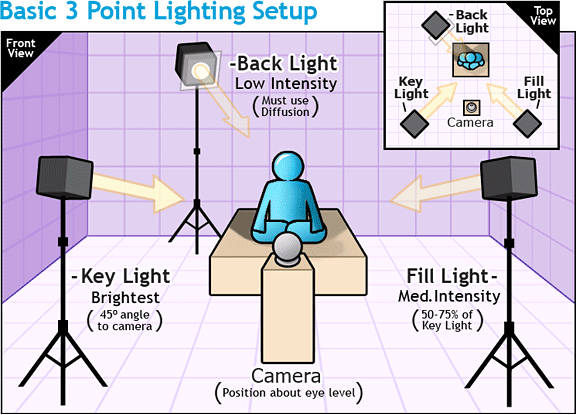
  3 Point Lighting Diagram
http://www.mediacollege.com/lighting/three-point/ Lighting
http://www.mediacollege.com/lighting/ambient/ Ambient Lighting

Point Light:
http://escience.anu.edu.au/lecture/cg/IlluminationJ3D/pointLights.en.html


Aspect Ratio: 
http://apex.infogridpacific.com/dcp/flo-aspect-ratio.html


Monday, May 10, 2021

Week 35b 2021 Post Production

May 10 - 14, 2021


Objective: Edit Video and Export
Assignment: Edit Video and Export
Details: Choose some editing software to edit your video clips with. For example; Premiere Pro, iMovie, Vegas Pro, Wevideo, and others.


Post Production

Details: Edit video clips
-Create a project folder
-Slice Video Clips
-Add Titles & Credits
-Add Effects: (examples: lighting effects, slow motion, reverse clip etc..)
-Add Transitions
-Remove and Add Sound
-Export or render clips into a stand alone movie.

Links:
Apple: iMovie
Chromebook Video Editor: https://www.wevideo.com/
Example: https://www.wevideo.com/view/1705347197


Photoshop Assignments