Monday, August 8, 2022

Week 1 2022 Welcome

August 15 - 19, 2022

Welcome to Digital Graphics Art Intro. This semester you will be learning how to use Illustrator, Photoshop, Animate, html, Audio, Film editing and many other software programs. Digital Graphics takes patience and practice but can be very rewarding. Each week you will be given an assignment do the best you can do. All of your assignments will be placed in an electronic portfolio.

Starter
Every day on the board answer the starter question in the first 5 minutes of class.

1st Day
-Take a picture of yourself
-Write a bio about yourself.
-Write 2 goals for this class.

Assignments
-Disclosure
-Pretest

Illustrator is a Vector based tool used to create logos, clip art, t-shirt designs, and many other graphics. Learned how to use the Selection Tool, Moving objects, creating rectangles, ellipses, changing color of the fill and stroke, Duplicating, rotating. Went over the Zoom tool, Align, and Pathfinder.


Assignments:
-Disclosure
-Boxes & Shapes 


Assignment: (boxes.ai)


Description: Only using boxes and color create a graphic or image.


Assignment 2: (Shapes.ai)

-Draw an image using the shapes tool.

Description: Add a background and other details to your shapes image.


Friday, May 13, 2022

Week 36b 2022 State Test

May 9-13, 2022

4-State Test Code (150pts)
Period 4: CZGZWNYR
Period 7: HCCPVKCA

 https://www.precisionexams.com/usoe/welcome/

Practice Test:
Digital Media Practice Test

Assignment: Study for test.

2019 Digital Media 1B State Standards

STANDARD 8
2D Animation -- Students will produce and utilize 2D animation.

:-) (-:

Keyframe
Frame by Frame Animation:
Tween
FPS: Frames Per Second
24 FPS for Animation.

STANDARD 9
Digital Video: Students will plan, create, edit, and publish digital video.

Camera Angles

Helpful websites for study:
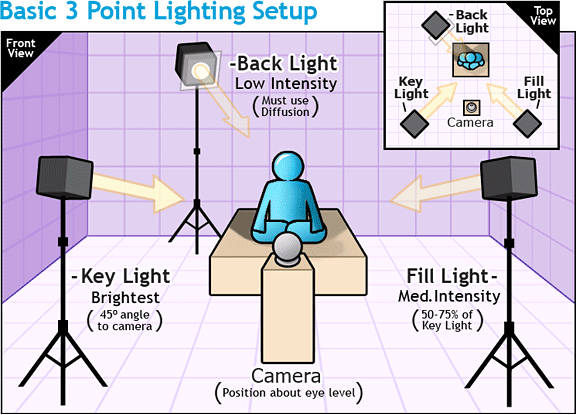
  3 Point Lighting Diagram
http://www.mediacollege.com/lighting/three-point/ Lighting
http://www.mediacollege.com/lighting/ambient/ Ambient Lighting

Point Light:
http://escience.anu.edu.au/lecture/cg/IlluminationJ3D/pointLights.en.html


Aspect Ratio: 
http://apex.infogridpacific.com/dcp/flo-aspect-ratio.html


Tuesday, May 3, 2022

Week 35 2022 Production Intro

May 2 - 6, 2022

Objective: Edit multiple layers of video
Assignment: Create a Production Company Intro using Photoshop & After Effects
Details: Layout a background, Name, and Graphic in Photoshop. Import Photoshop file into After Effects to animate for 5 to 10 seconds. Export to movie.
Link: https://freemangraphics.weebly.com/film--video.html


Video Tutorials


Monday, May 2, 2022

Week 35a 2022 Group Video

May 2 -6, 2022

Group Film Projects
Assignment: Script, Storyboard, Shot list
Description: Choose a prop. Write a script, create a storyboard and shot list. Film your video. Use five different camera angles.

Pre Production

-Script
-Storyboard
-Shot list

Production

-Filming

Post Production 

-Capturing Footage
-Editing
-Exporting

Film Project (300pts)
-50pts (Script, Storyboard, Shot List)
-50pts (Group Intro)
-50pts ( Title, Credits)
-50pts (5 Camera Angles)
-50pts (2 Sound FX)
-50pts (Export video clip)

Editing Skills

Details: Edit video clips
-Create a project folder
-Slice Video Clips
-Add Titles
-Add Effects: (examples: lighting effects, slow motion, reverse clip etc..)
-Add Transitions
-Remove and Add Sound
-Export or render clips into a stand alone movie.

Example: 


Wednesday, April 27, 2022

Week 34 2022 Video Edit 2

April 25 - 29, 2022


Objective: Edit Video Clips
Assignment: Video Edit 2
Description: Use the same clips you used for your last project. Using Adobe Premier Pro edit your clips and preform the same skills you did in your last project. Make sure you have a project folder set up


YouTube Down loaders

https://www.dlnowsoft.com/youtube-mp3
http://www.bestvideodownloader.com/
https://youtubemp4.biz/
Firefox: Easy Youtube Video Downloader Express
http://www.clipconverter.cc/


Free Videos:
https://www.videvo.net/
 https://www.pexels.com/

Details:
Show the following skills in your re-edit of a movie trailer:
-Slice Video Clips
-Add Titles
-Add Effects: (examples: lighting effects, slow motion, reverse clip etc..)
-Add Transitions
-Remove and Add Sound
-Export or render clips into a stand alone movie.


Wednesday, April 13, 2022

Week 33 2022 Video Editing

April 18 - 22, 2022


Objective: Edit Video Clips
Assignment: Re Edit Movie Trailer -100 pts
Description: Download and re-edit a movie trailer in iMovie. Find a movie on YouTube then download using a you tube downloader.


YouTube Down loaders

https://www.dlnowsoft.com/youtube-mp3
http://www.bestvideodownloader.com/
https://youtubemp4.biz/
Firefox: Easy Youtube Video Downloader Express
http://www.clipconverter.cc/


Free Videos:
https://www.videvo.net/
 https://www.pexels.com/

Details:
Show the following skills in your re-edit of a movie trailer:
-Slice Video Clips
-Add Titles
-Add Effects: (examples: lighting effects, slow motion, reverse clip etc..)
-Add Transitions
-Remove and Add Sound
-Export or render clips into a stand alone movie.


Monday, April 11, 2022

Week 32 2022 Final Cartoon

April 11- 15, 2022

Assignment: Final Cartoon Animation
-5 Sound FX (50pts.)
-Final Animation (50pts.)


Cartoon Project
Points
March 1-4Week 27
Character Design & Storyboard
100
March 7-11Week 285 Backgrounds50
March 14-18Week 29
Sound FX & Animation
150
March 21-25Week 30Title & Credits50
Mar. 28-31Week 31
Testing & Submit Portfolio
350
April 4-8Spring Break


Photoshop Assignments