Dec. 6 - 10, 2021
Objective: Edit Video Clips in Photoshop
Assignment: Animated Gif
Details: Animate two layers and save for web to create animated gif.
Size: 200 px. x 200 px. 72 Resolution.
Photoshop: Creating an animated gif
end
Starter Question
Thursday, December 9, 2021
Monday, December 6, 2021
Week 17 2021 Video Tutorial Effect
Dec. 6 - 10, 2021
Objective: Learn Something new.
Assignment: Video Tutorial Effect
Description: Choose a video tutorial from the internet and create your own project.
Save As: VT_Projectname.psd, VT_Projectname.jpg
Video Tutorials:
Objective: Learn Something new.
Assignment: Video Tutorial Effect
Description: Choose a video tutorial from the internet and create your own project.
Save As: VT_Projectname.psd, VT_Projectname.jpg
Video Tutorials:
Monday, November 29, 2021
Week 16 2021 Collage
November 29 - December 3, 2021
Objective: Combine 5 or more image in a layout.
Assignment: Collage
Details: Create a collage using 5 or more image. Include text, layer styles and a background.
Size: 10" x 7.5" 225 Resolution.
Objective: Combine 5 or more image in a layout.
Assignment: Collage
Details: Create a collage using 5 or more image. Include text, layer styles and a background.
Size: 10" x 7.5" 225 Resolution.
Thursday, November 18, 2021
Week 15 2021 Color Schemes
Nov. 22 - 23, 2021
Objective: Change color to an image using different color schemes.
Assignment: Color Schemes
Details: Download an image or images and change the colors to warm and cold colors. Change the colors to Mono, Complement, Triad, Tetrad, Analogic, Accented Analogic.
Link: http://colorschemedesigner.com/csd-3.5/
Save Images As: Warm.jpg , Cold.jpg, Mono.jpg, Complement.jpg, Triad.jpg, Tetrad.jpg, Analogic.jpg, Accented_Analogic.jpg.


Objective: Add an image inside text.
Assignment: Text Cutout
Details: Download a background of a city, landscape or texture. Overlay a thick text on top of the image. Use the text layer as a stencil and mask out the rest of the image.

Video Tutorial: Photoshop: Text Cutout
Objective: Change color to an image using different color schemes.
Assignment: Color Schemes
Details: Download an image or images and change the colors to warm and cold colors. Change the colors to Mono, Complement, Triad, Tetrad, Analogic, Accented Analogic.
Link: http://colorschemedesigner.com/csd-3.5/
Save Images As: Warm.jpg , Cold.jpg, Mono.jpg, Complement.jpg, Triad.jpg, Tetrad.jpg, Analogic.jpg, Accented_Analogic.jpg.


Objective: Add an image inside text.
Assignment: Text Cutout
Details: Download a background of a city, landscape or texture. Overlay a thick text on top of the image. Use the text layer as a stencil and mask out the rest of the image.

Video Tutorial: Photoshop: Text Cutout
Tuesday, November 16, 2021
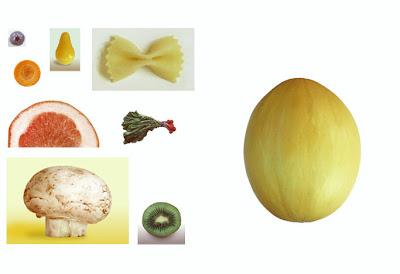
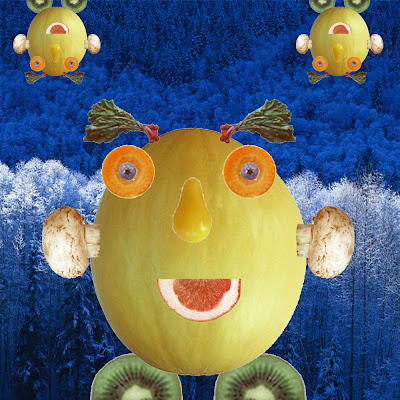
Week 14b Melon Man
November 15 -19, 2021
Objective: Use Select Tool to select objects.
Assignment: Melon man 50 pts.
Size: 5 inches by 5 inches, 200 Resolution
Melon Head
Images Gallery
Using the melon man image create a melon man using layers.


Video Tutorials
Move & Rectangular Marquee Tools
Layers
Free Transform
Magic Wand Tool
Objective: Use Select Tool to select objects.
Assignment: Melon man 50 pts.
Size: 5 inches by 5 inches, 200 Resolution
Melon Head
Images Gallery
Using the melon man image create a melon man using layers.


Video Tutorials
Move & Rectangular Marquee Tools
Layers
Free Transform
Magic Wand Tool
Wednesday, November 10, 2021
Week 14 2021 Postcard
Nov. 15 -19, 2021
Objective: Using rulers & Guides
Assignment: Postcard: Front & Back
Size: 6" x 4" 200 resolution
Description: Use rules and guides to layout boarders for a post card. Use any image you want and place in text that relates to the image. Create both a back and front for the post card.
Save Files: 8lastnameFI_postcard.psd
8lastnameFI_postcardback.jpg
8lastnameFI_postcardfront.jpg


Video Tutorial
Grouping Layers
Shape Tool
Creating the back of the post card.
Create 3D Post Card
Objective: Using rulers & Guides
Assignment: Postcard: Front & Back
Size: 6" x 4" 200 resolution
Description: Use rules and guides to layout boarders for a post card. Use any image you want and place in text that relates to the image. Create both a back and front for the post card.
Save Files: 8lastnameFI_postcard.psd
8lastnameFI_postcardback.jpg
8lastnameFI_postcardfront.jpg


Video Tutorial
Grouping Layers
Shape Tool
Creating the back of the post card.
Create 3D Post Card
![]() |
| From Photoshop |
Monday, November 8, 2021
Week 13b 2021 Brushes
November 8 - 12, 2021
Objective: Change color and shape of a brush.
Assignments: Brushes
Details: Download 10 Photoshop brush libraries from the Internet. You will create 3 different images only using brushes, paint buckets, gradients and filter effects.
http://myphotoshopbrushes.com/
Dimensions: Brushes 100 pts. (6" x 4" 200 res)
Save As: Brush1.jpg, Brush2.jpg, Brush3.jpg.

Video Tutorials:
Objective: Change color and shape of a brush.
Assignments: Brushes
Details: Download 10 Photoshop brush libraries from the Internet. You will create 3 different images only using brushes, paint buckets, gradients and filter effects.
http://myphotoshopbrushes.com/
Dimensions: Brushes 100 pts. (6" x 4" 200 res)
Save As: Brush1.jpg, Brush2.jpg, Brush3.jpg.

Video Tutorials:
Subscribe to:
Posts (Atom)